MrBeast subtitles:how the style is built
“MrBeast subtitles” is shorthand for a look: big, heavy words with a thick dark outline that pop onto the screen one word at a time. It reads at a glance on a phone, over any footage. Here is what the style is made of, the two ways to put it on a video, and how it maps to YouTube’s own caption format.
Today we fix that.
The five ingredients
A heavy, plain typeface
The words are set in the boldest weight of a simple sans-serif. Thin strokes disappear on a small screen; heavy ones survive compression, motion and a busy background. Decorative fonts work against the style, because the point is to be read in a fraction of a second.
A thick dark outline instead of a box
Standard captions sit on a translucent black box. The MrBeast look drops the box and wraps every letter in a dark outline, so the caption covers far less of the picture and still stands out against bright and dark shots alike.
A soft shadow under the outline
A blurred shadow slightly below the text lifts it off the footage. On its own an outline can look flat on busy scenes; the shadow adds the depth that makes the words feel like they sit on top of the video.
One word at a time
Words appear in step with the speech instead of showing the whole sentence at once. Viewers can’t read ahead of the speaker, their eyes stay near the centre of the frame, and fast talkers become easier to follow.
Few words and strong colour
Each caption holds only a few words, usually on one or two lines. The fill is white or a saturated colour — yellow is the familiar choice — and a second colour is kept for emphasis or for a second speaker.
Two ways to get the look
Burned into the video
Most video editors can render animated captions straight into the picture. The result looks identical everywhere the video plays, including clips reposted to other platforms. The trade-offs are just as permanent:
- there is only one language, and nobody can turn the captions off;
- fixing a typo means rendering and uploading the video again;
- YouTube doesn’t see the text as captions, so viewers can’t pick another language.
As a styled YouTube caption track
YouTube’s timed text format — often saved as a .ytt file and known inside YouTube as format 3, or SRV3 — carries fonts, colours, outlines, shadows, positions and per-word timing. Upload it as a caption track and the video file stays untouched:
- viewers switch the captions on and off, and pick the language in YouTube’s usual menu;
- every language is a separate track with the same styling;
- a typo is fixed by replacing the track, not the video.
The price is consistency. Different YouTube players render the format slightly differently, and viewers who changed their own caption settings in the player can override your colours and fonts.
How the style maps to YouTube’s caption format
A styled track is an XML file with two parts. The head defines pens — reusable text styles — and the body lists the caption lines, each pointing at a pen.
Pens and edge types
A pen sets the font, size, bold, text colour and opacity, plus one edge type with its own colour. YouTube knows four edge types: 1 hard shadow, 2 bevel, 3 glow and 4 soft shadow. There is no separate outline type — a glow in a dark colour does the job, and repeating the same line a few times makes the outline thicker.
Because a pen can only have one edge type, the MrBeast look needs the same line twice: a bottom copy with a soft shadow and a top copy with a dark glow.
<timedtext format="3">
  <head>
    <pen id="1" b="1" fc="#FEFEFE" fo="254" et="4" ec="#000000"/>
    <pen id="2" b="1" fc="#FFD93D" fo="254" et="3" ec="#000000"/>
  </head>
  <body>
    <p t="1000" d="1600" p="1"><s>Today</s><s t="350"> we</s><s t="600"> fix</s><s t="900"> that.</s></p>
    <p t="1000" d="1600" p="2"><s>Today</s><s t="350"> we</s><s t="600"> fix</s><s t="900"> that.</s></p>
  </body>
</timedtext>
A simplified example: pen 1 is the shadow layer, pen 2 the outlined yellow layer on top. Each <s> segment starts at its own offset t, which is what makes the words appear one by one.
The details that trip people up
- Size is not linear. In
sz, 100 is YouTube’s default — roughly 4.6–4.8% of the frame height — but the value moves four times faster than the real size:sz="200"gives 125%, not 200%. - Opacity stops at 254. A value of 255 is dropped, so fully opaque text is written as
fo="254". Caption tools also write pure white as#FEFEFE. - Positions have a safe margin. Horizontal and vertical positions run from 0 to 100, but YouTube maps them to 2–98% of the frame.
- Don’t start at zero. Some Android players ignore a line that starts at 0 ms; start the first caption at 1 ms or later.
- Mobile players need guards. Lines that mix several styled segments are padded with invisible zero-width characters; without them, some mobile apps collapse the styling.
Make MrBeast-style captions in Rainbow Captions
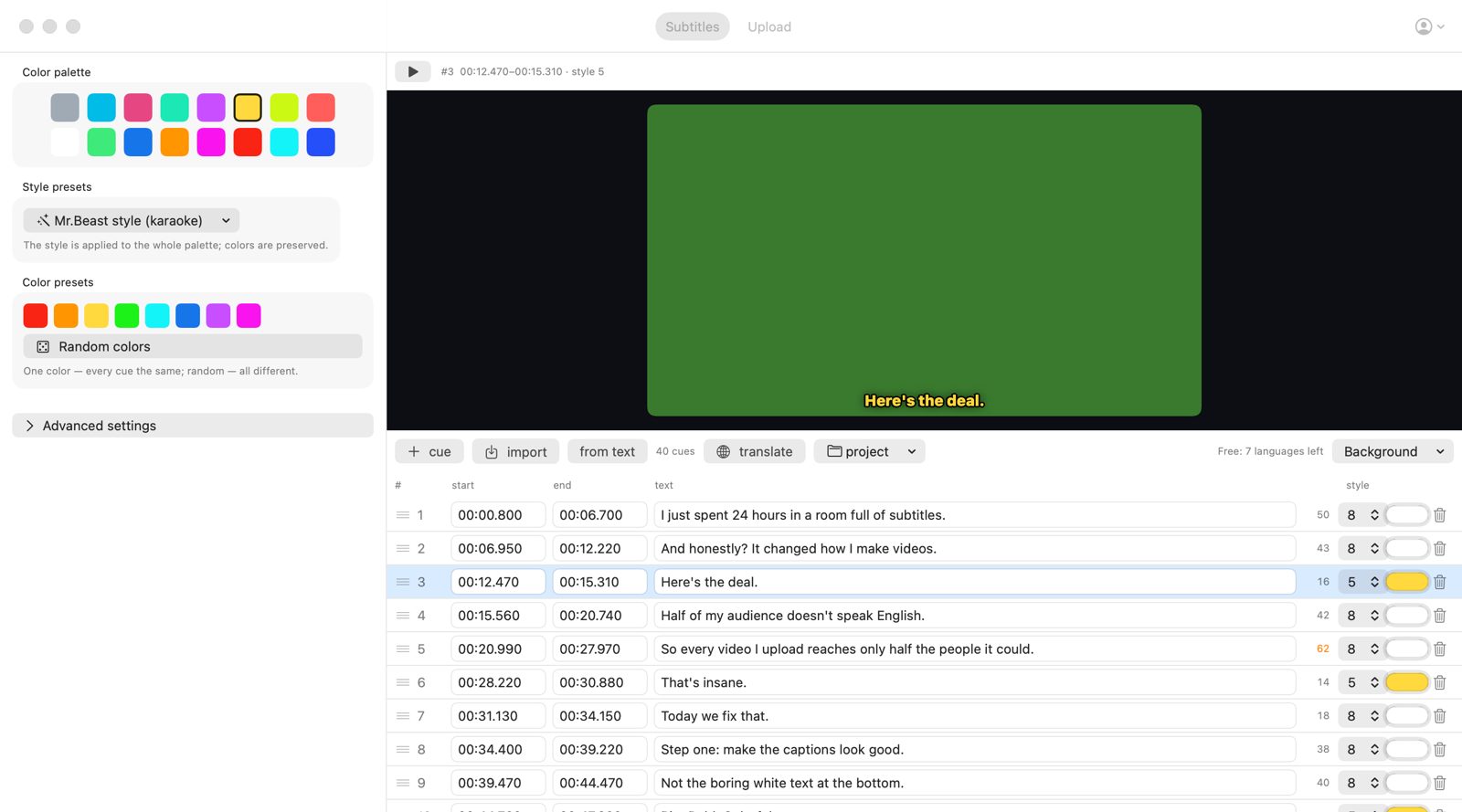
- Open your subtitles. Import SRT, VTT, SBV, ASS/SSA, TTML or plain text — or pull the caption track that is already on your YouTube video.
- Pick the Mr.Beast style (karaoke) preset. It builds the shadow and outline layers and the word-by-word timing for every line, and keeps your palette colours.
- Check the live preview. Play the lines over a 16:9 frame and change colours for emphasis or speakers.
- Translate. Choose the languages and press Translate. Each translation keeps the styles, timing and effects.
- Publish. Connect your channel, pick the video and upload the original and every translation as caption tracks.
Tips for captions people can actually read
- Keep two to five words on screen and break lines where the speaker pauses.
- Use one accent colour, and use it with intent: a key word or a second speaker, not every other word.
- Stay in the lower part of the frame, clear of faces and of YouTube’s player controls.
- Watch the result on a phone before you publish — that is where most viewers will see it.
- Read through machine translations, or ask a native speaker to skim the most important languages.
Questions
Can viewers turn MrBeast-style captions off?
Yes, when the style lives in a caption track: viewers switch captions on and off like any other track. Captions burned into the video can’t be turned off.
Do I need to re-upload my video to add styled captions?
No. A styled caption track is added to the video you already published. The video file isn’t changed.
Is Rainbow Captions connected to MrBeast?
No. “MrBeast style” describes a caption look that many creators use. Rainbow Captions is an independent app and isn’t affiliated with or endorsed by MrBeast, YouTube or Google.
Rainbow Captions builds the preset, the outline and the word-by-word timing, translates every line into 170 languages and publishes the tracks to YouTube. Free to download, first 10 languages free.
Download for Mac